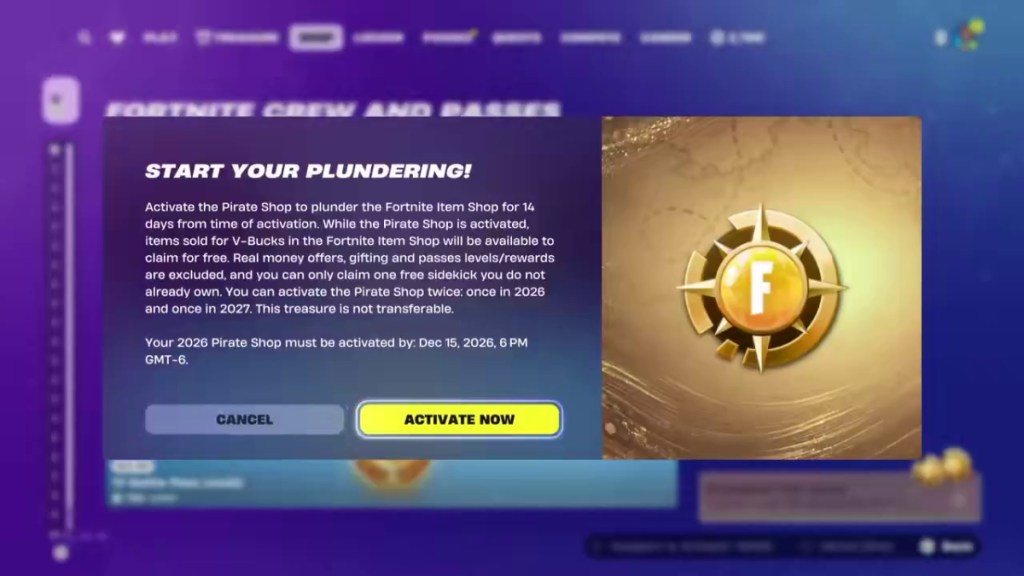
After receiving Pirate Shop Access, open the Item Shop, find the “Plunder the Item Shop” panel, and read the activation terms. Confirm “Activate Now” when you are ready for the 14-day clock to begin.
Sources: Beebom · Activation screenshots.
Activate the token in Fortnite
- Finish your match and return to the lobby. Check the account that received the access reward.
- Open the Item Shop. Look for the “Plunder the Item Shop” entry. Its position and wording may vary with your language and game layout.
- Read the year, deadline and exclusions. Finding access and activating access are separate actions.
- Select “Activate Now” to start. Access lasts 14 consecutive days from activation. Time away from the game is still part of that window.
- Claim the eligible offers you want. Check each offer’s displayed price and confirmation before proceeding. Return as the shop changes; unclaimed items are not automatically added to your locker.
Choose a time when you can check the shop regularly. Use the calculator to see when your window would end before activating in Fortnite.
What can you claim?
| Offer type | What to check |
|---|---|
| Outfits, emotes and other V-Bucks cosmetics | Eligible offers shown as free during the active access period |
| Jam Tracks | Reported as claimable; check the current offer |
| Real-money offers | Excluded, even when the bundle contains cosmetics |
| Gifts to another account | Excluded |
| Pass levels / pass rewards | Excluded; check any separate pass offer in-game |
| Sidekicks | One free Sidekick you do not already own |
You can claim one free Sidekick you do not already own, so choose carefully. Pass levels and rewards are excluded. Check any separate pass purchase in the game.
Sources: In-game activation screen · reproduced by Beebom · esports.gg · Access, restrictions and player reports.
2026 and 2027 token dates
Players have received separate 2026 and 2027 access rewards. The 2026 activation deadline is December 15, 2026. Published guides place the second reward’s use in 2027 and report a December 15 deadline for that year as well.
The activation deadline and the end of an already activated window are different things. Read both dates on your account. The 2026 activation screen shows December 15 at 6 PM GMT−6, equivalent to December 16 at 00:00 UTC. Compare that with your own in-game deadline.
Sources: Destructoid · How to access the Pirate Shop · esports.gg · Access, restrictions and player reports.
When should you activate?
Start with your own wish list. If a current eligible item is the main reason you want access, claiming it now avoids relying on a future return. If you mainly want an announced upcoming item, compare its arrival date with your planned end date and your token’s activation deadline.
Epic announced these November shop arrivals:
| Announced arrival | Items named by Epic |
|---|---|
| Season launch, Nov 1 | Luffy, Nami, Usopp |
| Nov 5, 7 PM ET | A$AP Rocky |
| Nov 7 | Zoro, Sanji, Chopper Sidekick |
| Nov 12 | Lil Uzi Vert |
| Nov 13 | Buggy |
| Nov 14 | Kasane Teto, Cap’n Hatsune Miku |
These are Epic’s announced arrival dates. Check the Item Shop for current availability and each offer’s leaving date.
Sources: Epic Games · Treasure Hunters announcement.
For example, a November 5 start creates an approximately November 19 end date at the corresponding local time. That window covers the later announced November arrivals. Check the offers available when you activate. The calculator shows when your 14 days would end.
If the access button is missing
- Confirm you actually received Pirate Shop Access, rather than another treasure reward.
- Check the same Epic account that received it and the reward year shown in your inventory or notice.
- Look for the access entry in the current Item Shop layout and restart the game if the reward screen has not refreshed.
- If the reward remains missing, use Epic’s Fortnite support with the relevant game details. Include a screenshot of the reward notice if you have one.
After activation
Can I pause the 14-day timer?
The 14-day timer continues while you are offline.
Do I keep the cosmetics afterward?
Player reports say items successfully claimed during access remain on the account. Check that a claim completed; simply viewing an offer does not claim it.
Can I gift or transfer my access?
Gifting is excluded and the token is reported as non-transferable. Party reward sharing at discovery is a separate mechanic.
Does this unlock every old skin?
Access applies to eligible offers available in the shop during your active window. It is not an unlock of the entire historical Fortnite cosmetic catalogue.